NGO Domain Ownership: Build a Digital Asset Register
Lost domains are one of the most common NGO operational failures. Learn how to take back ownership and build a Digital Asset Register.
Why domain ownership matters at an organisational level
"Ownership" and "control" of a domain are two different things. Many organisations assume that because they paid for it, or the website was built by their own team, they own it. But what actually controls a domain is whoever holds the login to the registrar account. If that account sits with one individual, the organisation can effectively be locked out at any time.
Common pitfalls
- Personal account registration — a staff member registers the domain with their own Gmail and credit card, then leaves without a proper handover
- Auto-renewal failures — the card on file expires or is cancelled, and the domain quietly lapses
- Notification emails going nowhere — renewal and change notices from the registrar go to one person's inbox
- No record at all — the organisation doesn't even know which registrar the domain is with, or which account it's under
Hong Kong's .hk domains are managed centrally by HKIRC (Hong Kong Internet Registration Corporation), while others like .com are handled through international registrars. The lookup and transfer process differs between the two, but the underlying principle is the same: you need to clearly establish who the actual owner is.
Finding out who really owns your domain
- Check WHOIS records — a WHOIS lookup shows the domain's registrar and expiry date. Note that personal details are often hidden nowadays for privacy reasons, so you may not see a registrant's name, but you'll at least learn which registrar it's with
- Identify the registrar account — once you know the registrar, check who at the organisation actually holds login access to that account
- Confirm the contact email — the email registered on the account should ideally be changed to a shared organisational address (e.g. admin@yourorg.hk), not a personal one
Transferring the domain to an organisational account
If the domain currently sits under a personal account, the safest move is to transfer it to a registrar account the organisation itself controls:
- Open a registrar account using an organisational email and organisational payment method
- Request a transfer authorisation code (transfer code / EPP code) from the current holder
- After the transfer completes, confirm DNS settings — especially MX records — are fully preserved to avoid disrupting email
Take extra care with email settings during the transfer window: a domain transfer gone wrong, or a DNS misconfiguration, can knock out organisational email immediately. If no one on staff has relevant experience, it's worth bringing in professional help for this step.
Building a Digital Asset Register
Once the domain situation is sorted, the next step is preventing this from happening again. That means building a "Digital Asset Register" — a central record of all the organisation's digital assets, so that even as staff rotate, the next person can pick up where the last one left off.
A basic register should include:
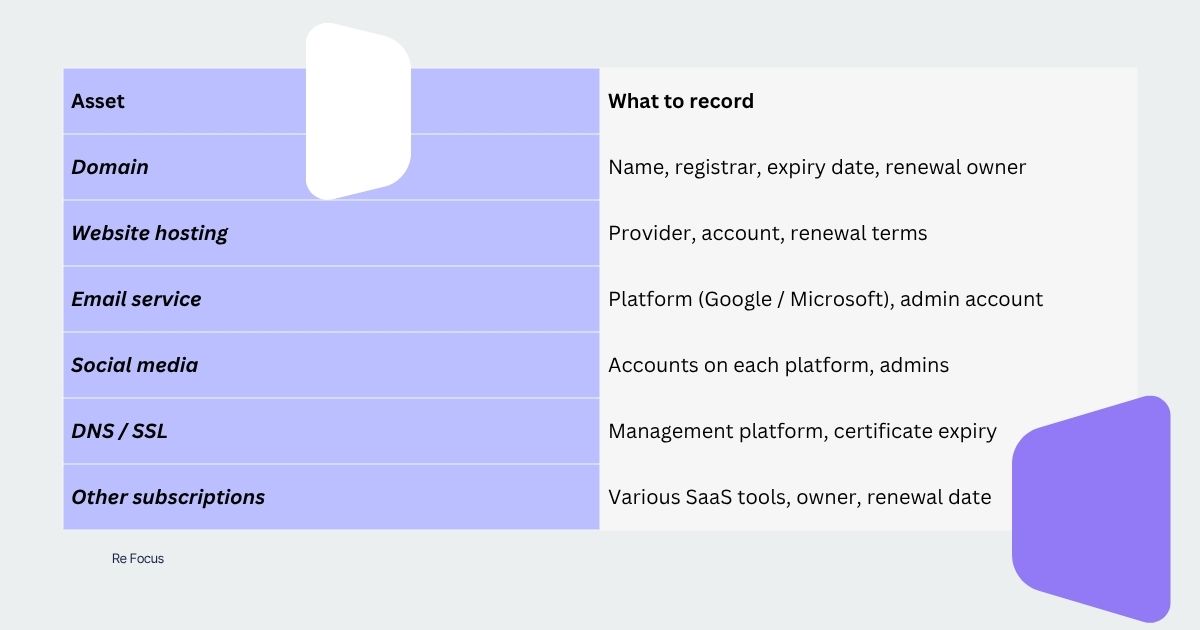
The key principle: every account should be registered under a shared organisational email, never a personal one. This is the same principle behind our related article, "Why Your NGO Should Stop Using Personal Gmail."
Best done alongside your email setup
If your organisation is also in the process of setting up institutional email, it's worth handling domain organisation at the same time — since applying for free Google or Microsoft email both require verifying domain ownership first. We'd suggest tackling both in one pass; see our related guide, "Google Workspace for Nonprofits: Hong Kong Setup Guide."